
https://shop.vertxglobal.com/wp-content/uploads/2024/12/69-2.jpg
  • https://shop.vertxglobal.com/wp-content/uploads/2024/12/69-2.jpg

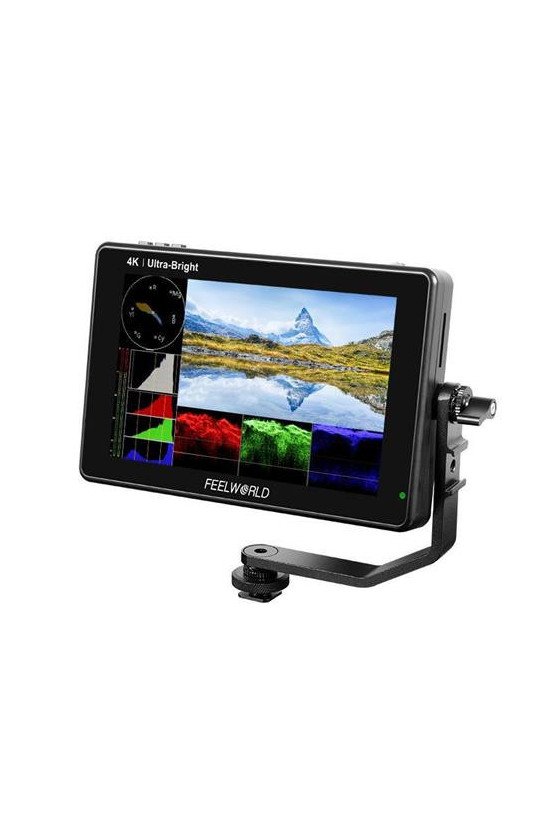
FEELWORLD LUT7 7 INCH ULTRA BRIGHT 2200NIT TOUCH SCREEN CAMERA DSLR FIELD MONITOR WITH 3D LUT

AED989.00
Tax included Delivered within 1-2 days
https://shop.vertxglobal.com/wp-content/uploads/2024/12/69-2.jpg

FEELWORLD LUT7

AED989.00
Tax included Delivered within 1-2 days
Quantity :
Size Guide
Shipping
Ask a Question
Last items in stock

  Security policy

(edit with the Customer Reassurance module)

  Delivery policy

(edit with the Customer Reassurance module)

  Return policy

(edit with the Customer Reassurance module)

User LUT Cube Import Provides S-log2/3, V-log, Log-C, etc, to convert log mode to REC709 for all major cameras. The LUT loading function makes the color calibration work of the previous shooting easier and more intuitive, optimizes the workflow, and improves work efficiency. User creative 3D LUT cube or calibration 3D LUT cube can be uploaded to monitor by SD card. Video Analysis Assistant Pattern Waveform / Vectorscope / Histogram Waveform This essential feature assists with the calibration of professional video cameras. It shows the overall brightness of the image assisting the video professional in correcting exposure. The waveform feature also checks the evenness of the lighting when lighting a chromakey or background. Vectorscope Vectorscope shows how saturated the image is and where the pixels in the image land on the color spectrum. It can also be displayed in various sizes & positions, which allows users to monitor color gamut range in real-time Brightness Histogram The Brightness Histogram is a quantitative tool to check the picture brightness. The feature shows the distribution of brightness in an image as a graph of brightness along the horizontal axis (Left: Dark, Right: Bright)and a stack of the number of pixels at each level of brightness along the vertical axis. RGB Histogram RGB histogram is a graphical display of the distribution of tones, shows the Red, Green, and Blue channels histograms. Suitable for HD-SDI and HDMI signal monitoring. All Scopes Mode This mode shrinks your video image to approximately the size of a 7? display and tiles your choice of the waveform, vectorscope, histogram, and embedded audio on the border of your video. Audio Meter Monitoring The Audio Level Meters provide numerical indicators and headroom levels. It can generate accurate audio level displays to prevent errors during monitoring. Under SDI audio, it supports a 4-ch embedded audio meters display. Under HDMI audio, only 2 channels of audio displays are supported. Peaking Focus Assist The Peaking Filter is used to aid the camera operator in obtaining the sharpest possible picture. When activated, the internal processor will display a colored highlight on the screen where sharp edges appear. You can switch the peaking color between yellow, red, green, blue, white according to the different tones of the subject. The focus level can be adjusted from 1 to 10 levels. False Color The False Color filter is used to aid in the setting of camera exposure. As the camera Iris is adjusted, elements of the image will change color based on the luminance or brightness values. This enables proper exposure to be achieved without the use of costly, complicated external test equipment. Exposure (Zebras) The Exposure is used to assist in exposure adjustment in the mode of Zebra Pattern. It is considered overexposed and displays the moving warning lines onto the overexposed areas. There is a 1%-100% zebra value that can be adjusted. Check Field Check Field is an assistant function to adjust camera color settings. Under the check field mode, you can use red, green, blue, or gray pixels to generate the image, because hue and saturation can be adjusted more quickly and accurately in this environment. Zoom In (100%?300%) Image magnification is an HD signal in any part, an amplification for a high-quality close-up. The touch panel can help you zoom in quickly, zoom out, and move the image after zooming in. Anamorphic Mode Built-in selection of no squeeze, 1.25x, 1.33x, 1.5x, 2.0x, or 2.0x mag allows you to use anamorphic lenses or adapters and see the image unsqueezed, even if your camera does not de-squeeze in camera. Image Flip Image flip is to flip the image horizontally, vertically, and horizontally/vertically. Simultaneously turning on the horizontally flip and the vertical flip can achieve horizontal/vertical simultaneous flipping. Nine Grid Nine grid is the most common and basic composition method. The area of the picture is divided into nine equal grids. Pixel to Pixel Enable the filmmaker to check the image from the 1:1 signal source without scaling. This feature is essential for capturing optimum detail. Center Marker & Safety Marker Safety Marker for View Finding and Composition (70%, 80%, 90%, 16:9, 16:10, 4:3, 5:4, 1.85:1, 2.35:1). You can switch the Mark color between Yellow, Red, Green, Blue, White, and Black according to the different tones of the subject. Ratio Marker There are a variety of ratio marker (16:9, 16:10, 4:3, 1.85:1, 2.35:1); the transparency of the ratio marker has 4 display effects optional (0%, 25%, 50%, 75%). You can switch the marker colors between yellow, red, green, blue, white, and black according to the different tones of the subject.
Freeworld
This product has no reviews!

Call Our Store

+971 45579581

sales@vertxglobal.com

Working hours of our store:

On weekdays:

Saturday:

Sunday:

from 8:00 to 21:00

from 9:00 to 20:00

from 10:00 to 19:00